Developer Guide
Contents
- About SEPlanner
- Acknowledgements
- Getting Started
- Design & Implementation
- Product Scope
- User Stories
- Non-Functional Requirements
- Glossary
- Instructions for manual testing
- Possible future updates
About SEPlanner
SEPlanner is a lightweight desktop application for Computer Engineering undergraduates from the National University of Singapore (NUS) to plan for their Student Exchange Program (SEP), optimized for use via Command Line Interface (CLI).
Acknowledgements
- EduRec: For the list of possible module mappings
- AB3: For the format of the user guide and developer guide
Getting started
Refer to our user guide here.
Design & implementation
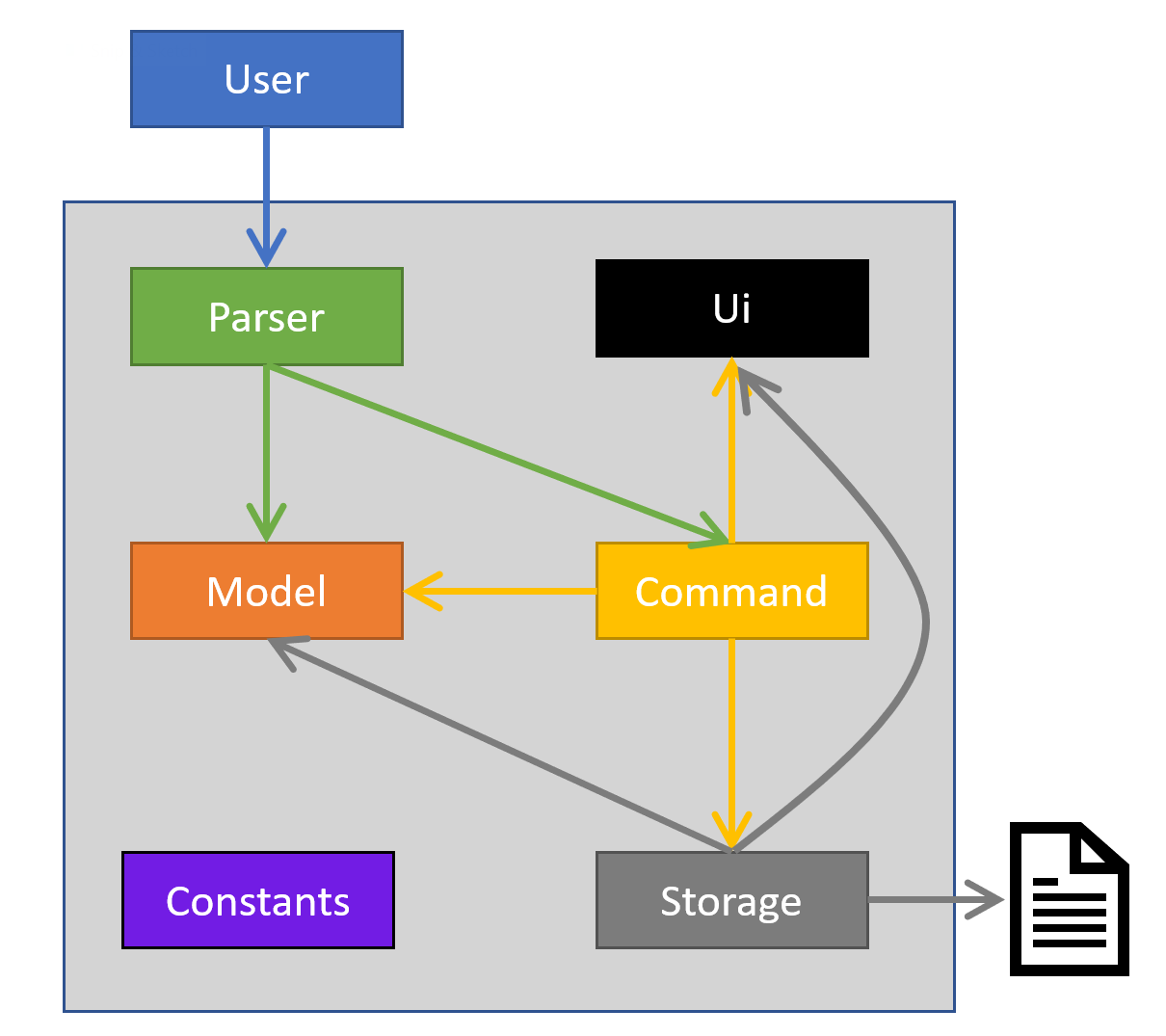
The Architecture Diagram above explains the high-level design of the App.
Main Components
The main class of SEPlanner is the Seplanner class. It is responsible for initializing the other components when the program
gets started while handling interactions between the other components.
The other core components of SEPlanner are:
Ui : Handles the UI of SEPlanner and prints outputs to the user.
Parser : Handles user inputs and passes them down to the Command class.
Command : Handles output passed down from Parser based on the user inputs and execute user instructions.
Storage : Loads data from, and stores data back to the user’s local machine.
UniversityList and ModuleList : Stores information about Universities and modules as well as the methods to amend and filter them.
Command Interaction
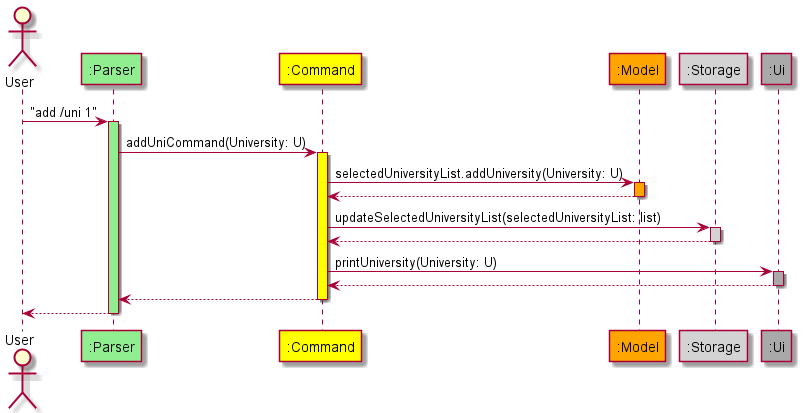
The sequence diagram above illustrates the flow through our program structure when the user input add /uni 1
is entered.
When the user runs the add /uni 1 action on the parser class, the parser class calls the addUniCommand method
in the addUniCommand class by passing the university with master index 1 to it.
The addUniCommand class then
- calls the
selectedUniversityList#addUniversitymethod in the model class by passing the university to implement the action. - calls the
updateSelectedUniversitymethod in the storage class by passing the selected university list to update the stored selected list - calls
printUniversityin the UI class. by passing the university to display the message of adding the selected university to the user.
Command Implementation
API : Command.java
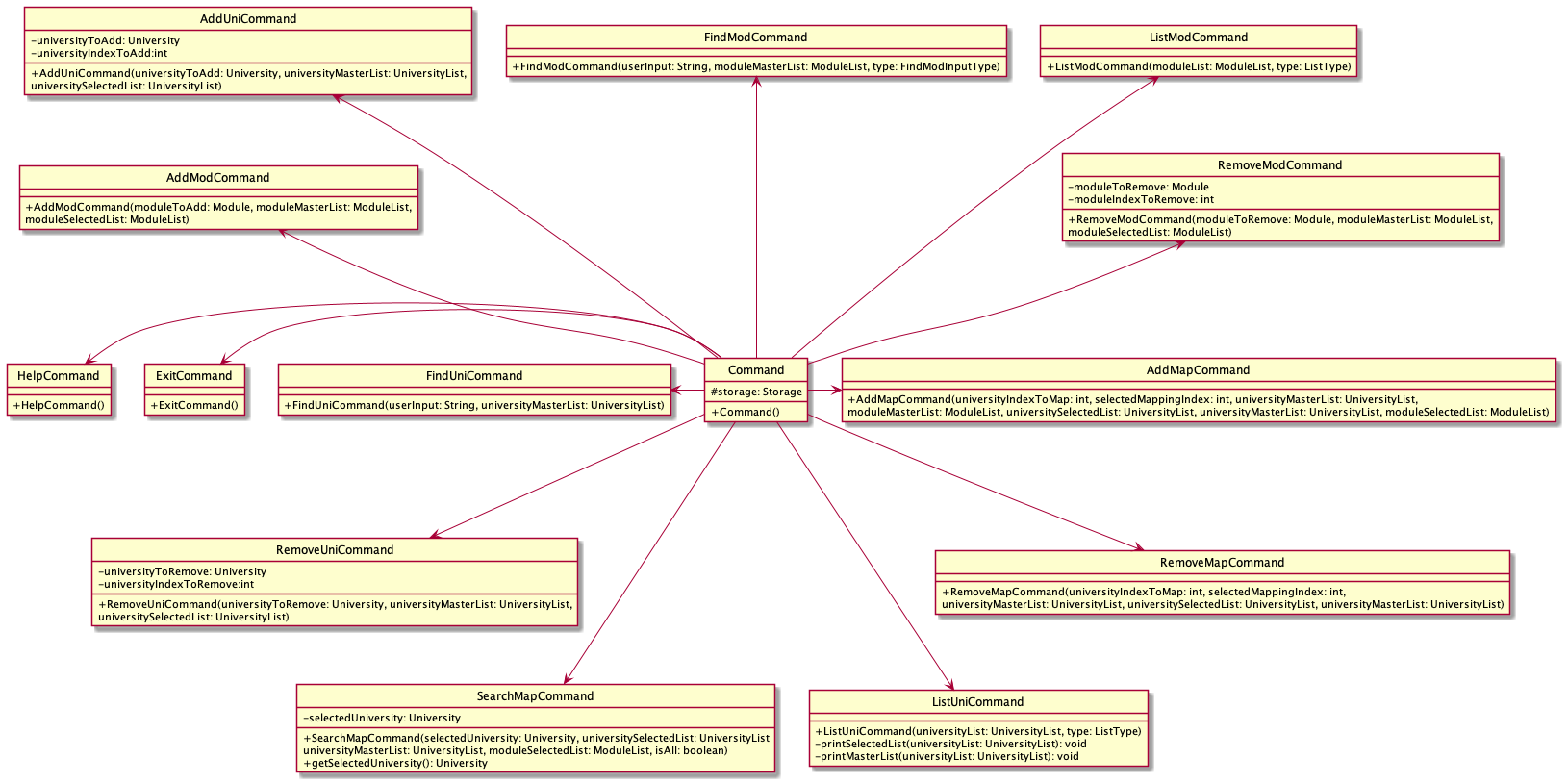
AddModCommand
When the AddModCommand constructor is called in the AddModCommand class. It will call the addModule method in the moduleList class under Model, adding the module in the selected module list. Then it will call the updateSelectedModuleList method in the storage class to update the selected list with the new module added. Finally, it will call the printModule method in the UiModule class to print the message of adding the module to the user.
AddUniCommand
When the AddUniCommand constructor is called in the AddUniCommand class. It will call addUniversity method in the universityList class under Model, adding the university in the selected university list. Then it will call the updateSelectedUniversityList method in the storage class to update the selected list with the new university added. Finally, it will call the printUniversity method in the UiUniversity class to print the message of adding the university to the user.
AddMapCommand
When the addMapCommand constructor is called in the AddMapCommand class. It will call the addMapping method in the university class under Model, adding the mapping under the selected university in the selected university list. Then it will call the updateSelectedUniversity method in the storage class to update the selected list with the new mapping added. Finally, it will call the printUniversity method in the UiMapping class to print the message of adding the mapping to the user.
RemoveModCommand
When the RemoveModCommand constructor is called in the RemoveModCommand class. It will call the removeModule method in the moduleList class under Model, removing the module in the selected module list. Then it will call the updateSelectedModuleList method in the storage class to update the selected list with the module removed. Finally, it will call the printModule method in the UiModule class to print the message of removing the module to the user.
RemoveUniCommand
When the RemoveUniCommand constructor is called in the RemoveUniCommand class. It will call removeUniversity method in the universityList class under Model, removing the university in the selected university list. Then it will call the updateSelectedUniversityList method in the storage class to update the selected list with the university removed. Finally, it will call the printUniversity method in the UiUniversity class to print the message of removing the university to the user.
RemoveMapCommand
When the RemoveMapCommand constructor is called in the RemoveMapCommand class. It will call the removeMapping method in the university class under Model, removing the mapping under the selected university in the selected university list. Then it will call the updateSelectedUniversity method in the storage class to update the selected list with the mapping removed. Finally, it will call the printUniversity method in the UiMapping class to print the message of removing the mapping to the user.
ListModCommand
When the ListModCommand constructor is called in the ListModCommand class. It will call the getSize() method in the moduleList class to check if the list is empty: if the list is empty, it prints the error message. If the list is not empty, it calls the printModule method in the UiModule class in a loop to print all modules found.
ListUniCommand
When the ListUniCommand constructor is called in the ListUniCommand class. It will call the getSize() method in the UniversityList class to check if the list is empty: if the list is empty, it prints the error message. If the list is not empty, it checks the type of university list chosen. If the master list is chosen, the printMasterList method is called, which calls printUniversity method in the UiUniversity class to print out all universities in the master list. If the selected list is chosen, printSelectedList is called, which calls printUniversity method in the UiUniversity class to print out all universities in the selected list and calls listAllMappings method in the universityList class to print all module mappings under each university as well.
FindModCommand
When the FindModCommand constructor is called in the FindModCommand class. It will get the list of module results by searching in the moduleMasterList. Then it checks if the result list is empty: if the result list is empty, it calls the printFindModNull method in the UiInvalid class to print the error message. If the result list is not empty, it calls the printModule method in the UiModule class in a loop to print all modules found.
FindUniCommand
When the FindUniCommand constructor is called in the FindUniCommand class. It will get the list of university results by searching in the universityMasterList. Then it checks if the result list is empty: if the result list is empty, it calls the printFindUniNull method in the UiInvalid class to print the error message. If the result list is not empty, it calls the printUniversity method in the UiUniversity class in a loop to print all universities found.
SearchMapCommand
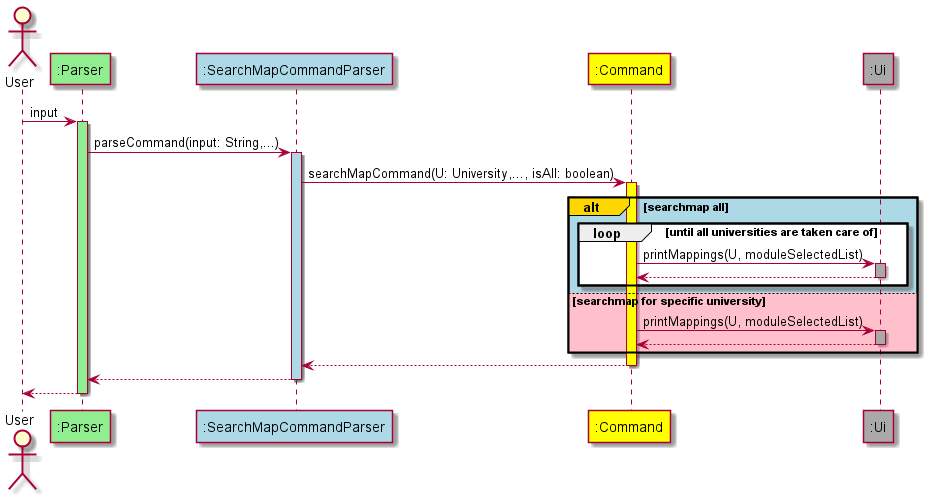
When the SearchMapCommand constructor is called in the SearchMapCommand class, it will check if isAll is true. If isAll is true, the printMappings method will be called, which prints all mappings from the selected module list for all universities in the selected university list by calling the printIndex method in the Ui class and listSelectedMappings method in the University class. If isAll is false, it will call the printMappings method to print out only the mappings for the selected university only.
The following sequence diagram illustrates how the whole process is carried out.
HelpCommand
When the HelpCommand constructor is called in the HelpCommand class. It will print out all commands available for SEPlanner.
ExitCommand
When the ExitCommand constructor is called in the ExitCommand class. It will call the printExit method in the UiGeneral class to exit the program.
User Interface
API : Ui.java
The Ui component consolidates and formats the output of the program before displaying it to the user in the command line.
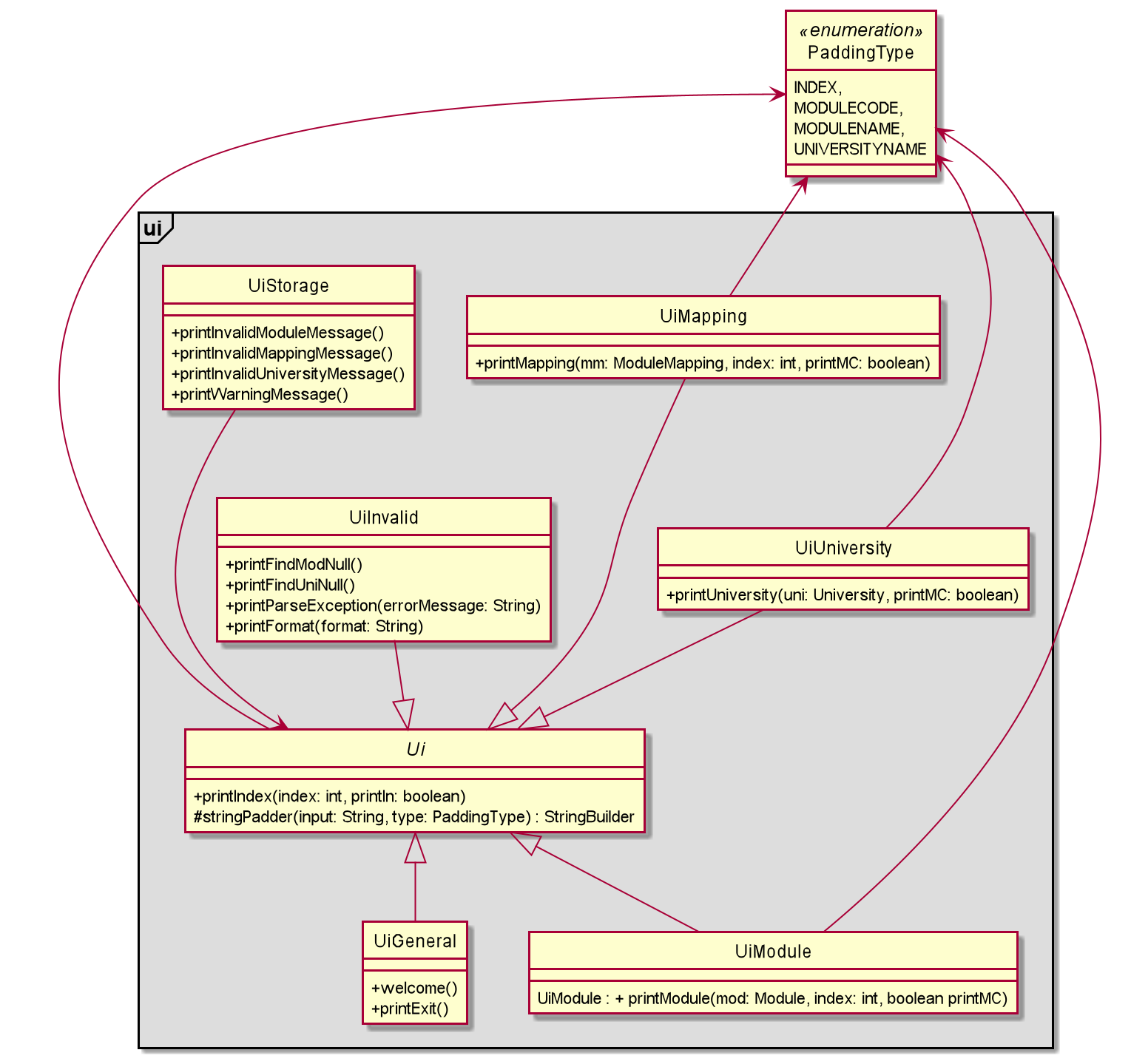
The above class diagram illustrates the relationship between the classes within the Ui components.
The Ui class is the parent of every other class in the package.
- Contains helper methods for the other Ui classes.
- Provides means of printing constants.
The UiInvalid class contains methods for printing messages from the Parser component.
The UiMapping class contains methods for printing module mappings.
The UiModule class contains methods for printing modules.
The UiUniversity class contains methods for printing universities.
The UiWelcome class contains a method for printing the welcome greeting.
The UiInvalid class contains methods to display error messages to the user.
The UiStorage class contains methods to display error messages from the Storage component to the user.
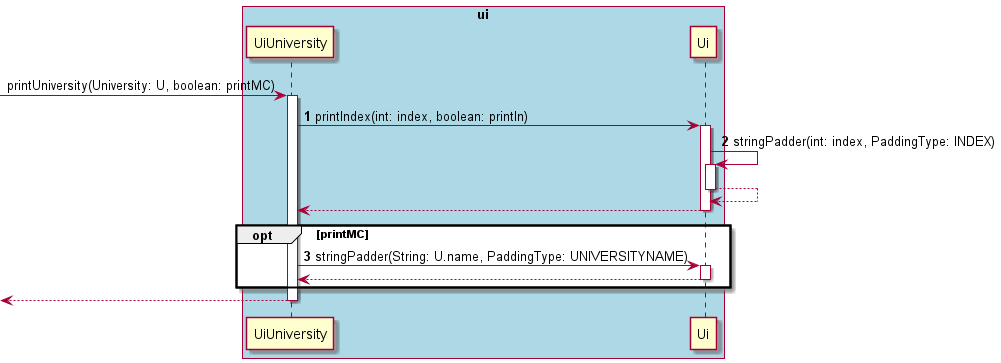
The sequence diagram above illustrates how the classes in the Ui package interact when a printUniversity() call is made from outside the package.
In the printUniversity() Method,
-
printIndexis called from the Ui class. - Within
printIndex, we display the index, then do a self-invocation on stringPadder within the Ui class to pad the string to line up the text after. - After printing the index, print the university name, then depending on the boolean printMC, we pad it again with stringPadder before displaying the Module Credits.
Storage
API : Storage.java
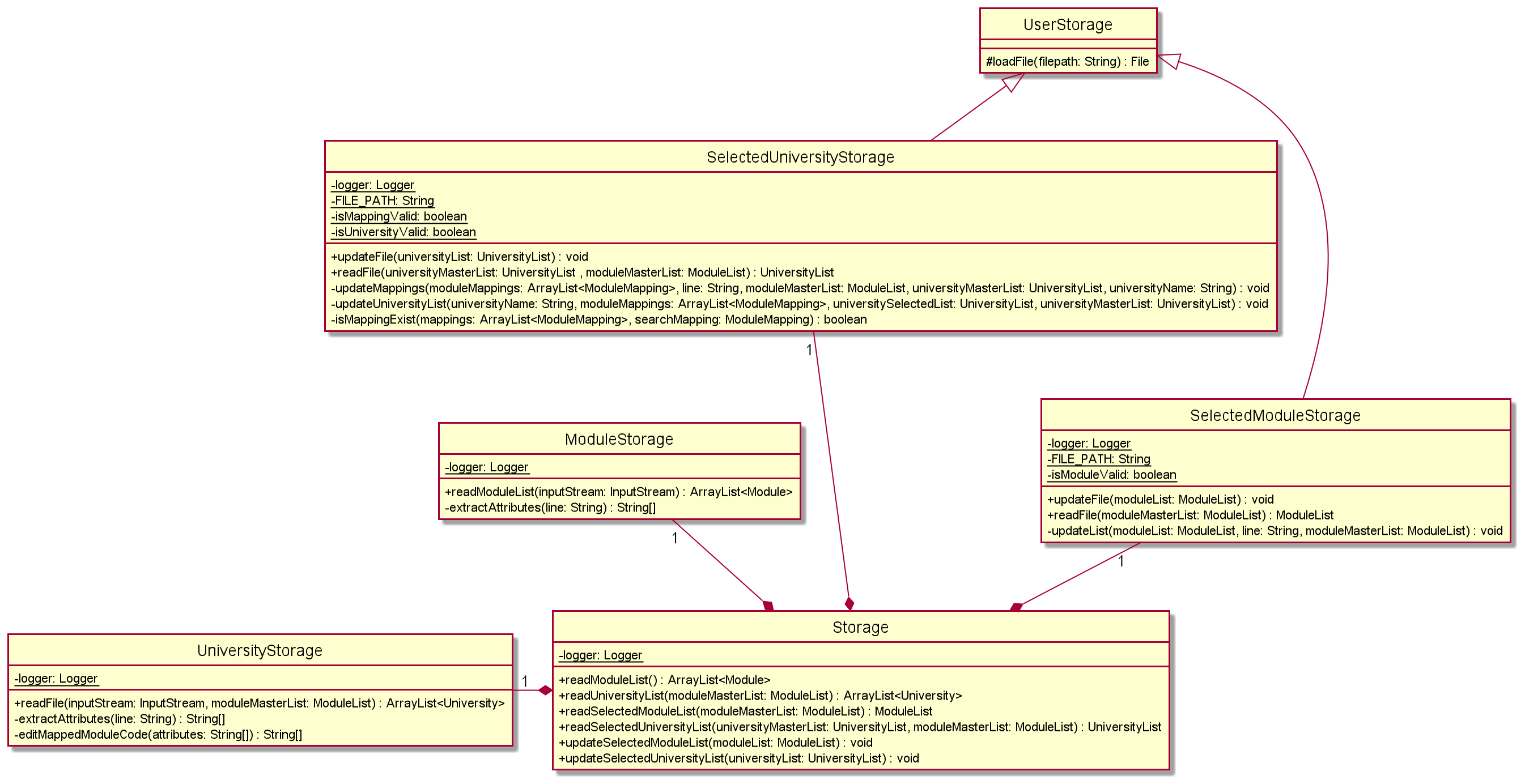
The Storage component can implement the below features:
- Read the list of module mappings offered by each university from the CSV file.
- Read the list of NUS modules that can be mapped from the CSV file.
- Save both the user’s module mappings for each university and their selected NUS modules in text file and read them back into corresponding objects.
The purpose of each class in the storage component, except the Storage class, is to handle a specific file. The Storage
class is used to link all the other classes. This is done by creating an object of other classes, to access all the necessary
methods required.
The classes SelectedUniversityStorage and SelectedModuleStorage are responsible for reading and updating the text files
storing your selected university list and your selected module list. These classes inherit from the UserStorage class as the loadFile function
is identical other than the file path. The private methods in both classes filter out the invalid data found while reading the
text files.
The classes UniversityStorage and ModuleStorage are responsible for extracting the Master University List and Master Module List
from the CSV type files (University.csv and modules.csv) stored in the resources root.
University and module related classes
API : University.java
API : Module.java
The following diagram is the class diagram of the university related classes:
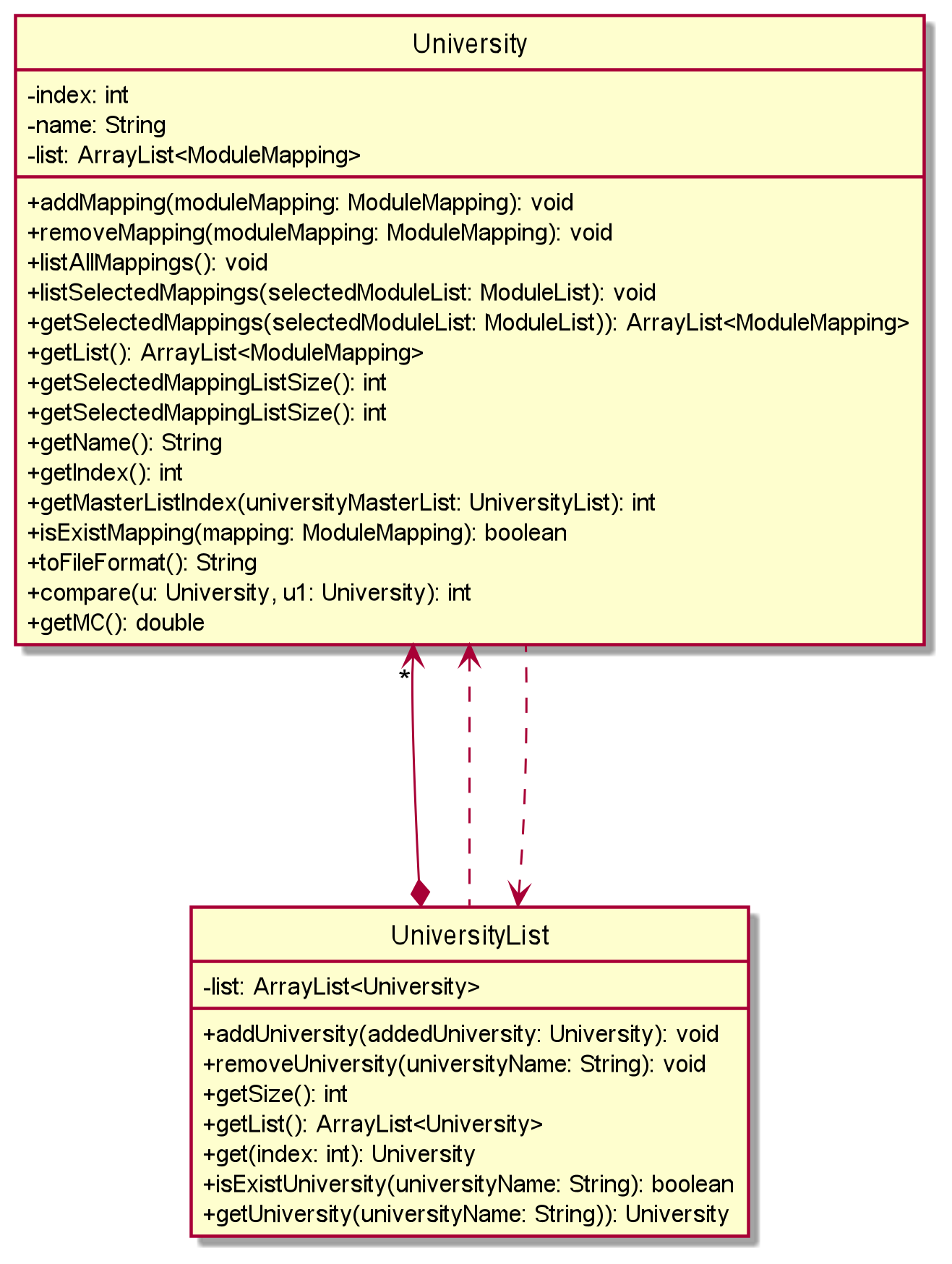
This component consist of the following classes:
University
- Stores basic information of a university.
- Stores the unique index for each university in
index, this index can be used to refer to a specific university in the commands. - Stores the university name in
name. - Stores
ModuleMappingobjects associated with this university in an array listlist. - For
Universityobjects under the master list,liststores all possible module mappings from this university for the user to choose from. - For
Universityobjects under the selected list by the user,liststores all the module mappings the user has chosen to add to this university for their SEP application.
UniversityList
- Stores
Universityobjects. - Can be used under the following 2 circumstances:
- Stores the master list containing all universities available for CEG SEP application. This list is directly read from an external file
University.csv. - Stores the selected list containing all universities added by the user. This list can be amended by the user, and all changes to it will be stored under
data/selectedUniversities.txt.
- Stores the master list containing all universities available for CEG SEP application. This list is directly read from an external file
- Contains methods to search, filter, or amend the list based on the command from the user.
- There can be 2
Universityobjects for the same university, one stored in each of the lists mentioned above. The object stored in the master list contains all the possible module mappings for this university based on our database, while the object stored in the selected list stores the mappings added by the user. These 2 objects cannot be used interchangeably. While holding reference onto one of the objects, the user needs to call the methodgetUniversity(universityName)to access the corresponding object from the other list.
The following diagram is the class diagram for the module related classes:
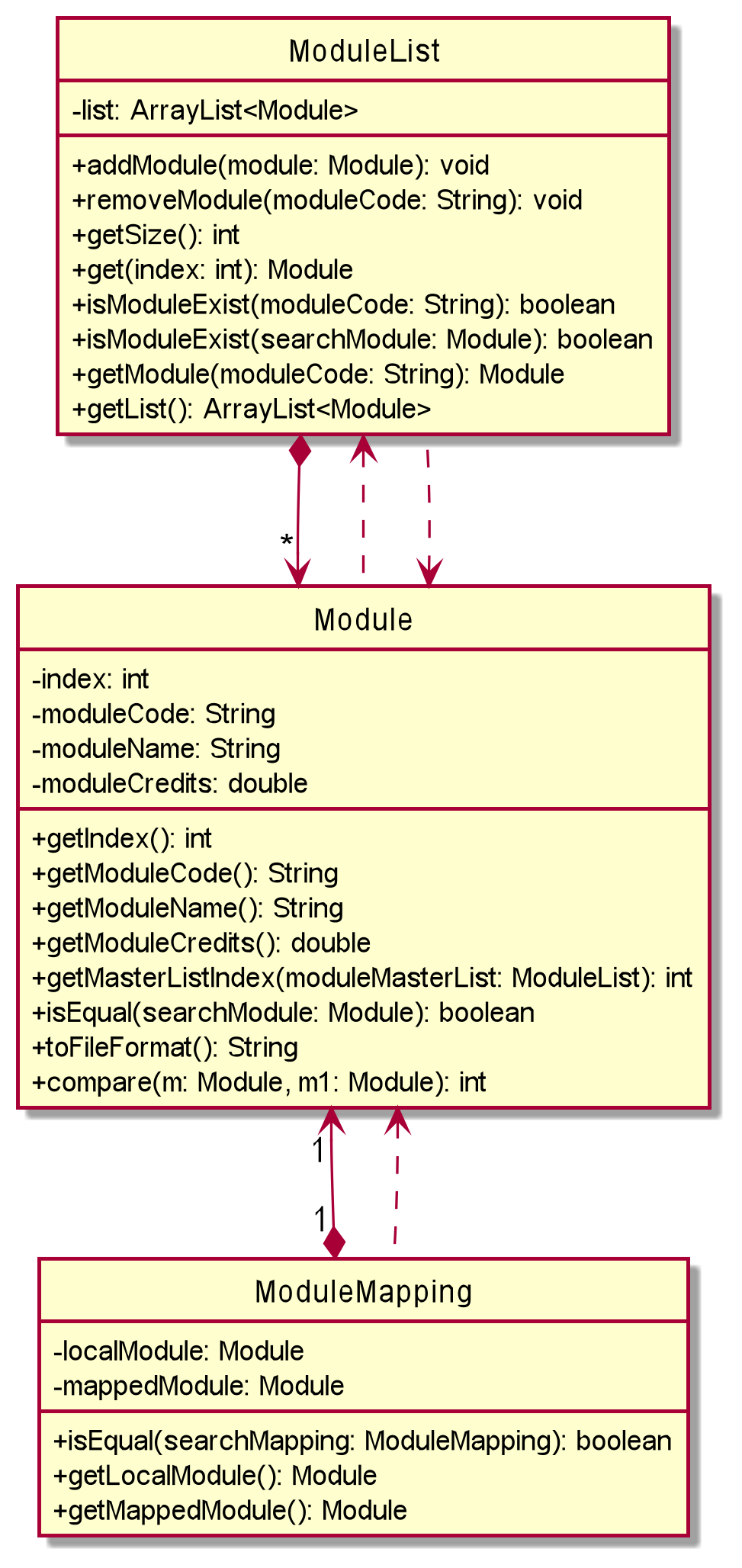
This component consist of the following classes:
Module
- Stores basic information of a module.
- For NUS modules, stores the unique index for each module in
index, this index can be used to refer to a specific module in the commands. - Stores the module code in
moduleCode. - Stores the module name in
moduleName. - Stores the modular credits of this module in
moduleCredits.
ModuleList
- Stores
Moduleobjects. - Can be used under the following 2 circumstances:
- Stores the master list of all NUS modules available for the users to choose from.
- Stores the selected list unique to each user based on the modules they choose to take.
ModuleMapping
- Stores 2
Moduleobjects as a pair of module mapping. - Stores the local NUS module in
localModule. - Stores the partner university module in
mappedModule.
Parser Component
API : Parser.java
The parser component is made up of the following classes:
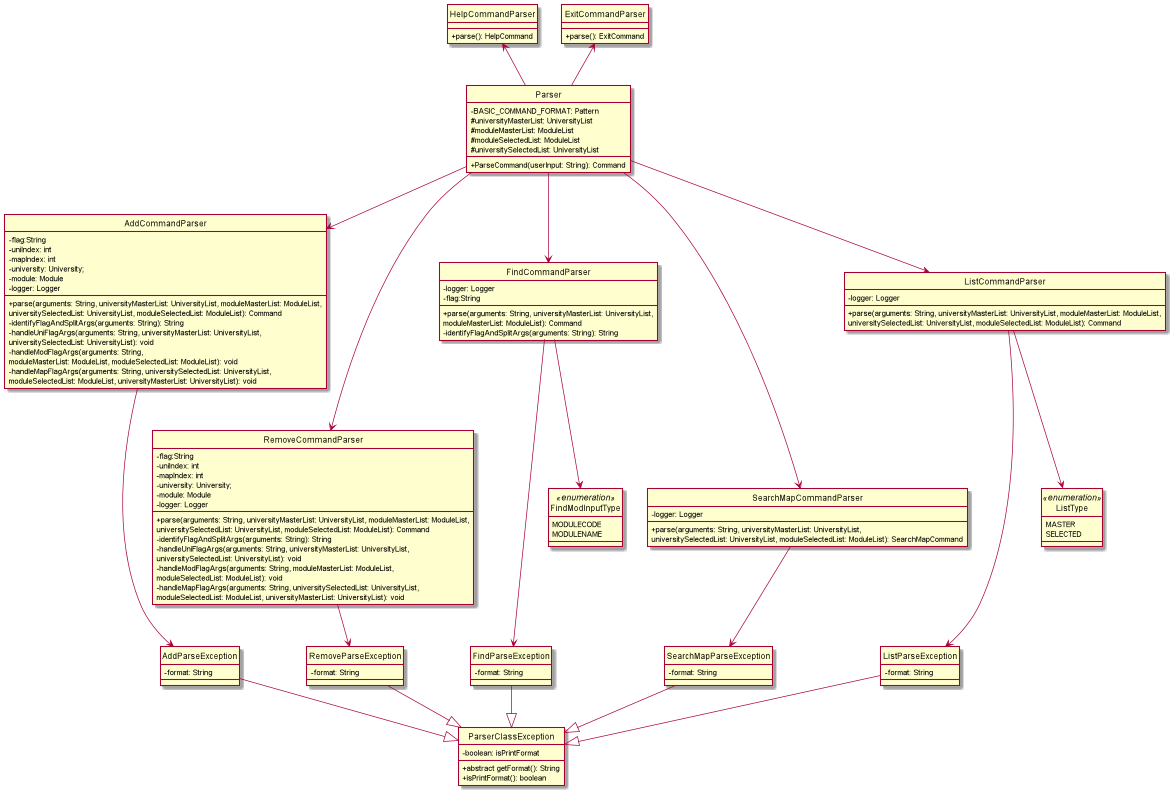
Parser component is used to make do the following:
- Identify the command word and invoke the respective argument parser for the command.
- Handle the arguments and return the respective Command object.
- Ensures that the command, flags and, arguments are entered in the correct format.
Parser
- This is the main parser class that will handle raw inputs and identify command words and invoke the respective command parsers instance and returns the respective
Commandobject.
ParseCondition
- This class contains methods used by various parser classes to verify that the inputs are valid.
AddCommandParser
- This object when invoked, will first identify the flag
/uni,/modor/map. Once the flag is identified, the arguments corresponding to the flags will be extracted. - For
/unithe argument should either be an integer representing<UNI_INDEX>or a String representing<UNI_NAME>. A newUniversityobject will be created and passed as an argument to the constructor forAddUniCommand. - For
/modthe argument should either be an integer representing<MOD_INDEX>or a String representing<MODULE_CODE>. AModuleobject will be duplicated from the Master Module List and passed as an argument to the constructor forAddModCommand. - Both the
/uniand/modflag will be checking for the type of inputs passes in and handling them accordingly. - For
/mapthe argument should be two integers representing<UNI_INDEX>and<MAPPING_INDEX>and will be passed into the constructor forAddMapCommand.
RemoveCommandParser
- This object when invoked, will first identify the flag
/uni,/modor/map. Once the flag is identified, the arguments corresponding to the flags will be extracted. - For
/unithe argument should either be an integer representing<UNI_INDEX>or a String representing<UNI_NAME>. TheUniversityobject representing the particular university from the Selected University List will be passed as an argument to the constructor forRemoveUniCommand. - For
/modthe argument should either be an integer representing<MOD_INDEX>or a String representing<MODULE_CODE>. TheModuleobject represents the particular module from Selected Module List and is passed as an argument to the constructor forRemoveModCommand. - Both the
/uniand/modflag will be checking for the type of inputs passes in and handling them accordingly. - For
/mapthe argument should be two integers representing<UNI_INDEX>and<MAPPING_INDEX>and will be passed into the constructor forRemoveMapCommand.
FindCommandParser
- This object when invoked, will first identify the flag
/uni,/codeor/mod. Once the flag is identified, a String representing<KEYWORD>is extracted and passed as an argument to the constructor forFindUniCommandorFindModCommand.
SearchMapCommandParser
- This object when invoked, will take the first argument and determine if it is an integer representing
<UNI_INDEX>or the flagalland pass it to the constructor forSearchMapCommand.
HelpCommandParser
This object will return an instance of HelpCommand.
ExitCommandParser
This object will return an instance of ExitCommand.
ParserClassException
- This is an abstract class inherited from Java 11’s
ParseExceptionand its children objects are thrown when an input is detected as invalid. - Each command word has its respective
ParserClassExceptionwith its format inside. - On top of the parameters for
ParseException, an additional boolean variable is required to identify when the user has made a format error in the command and the correct format will be output to the user. - Any instance of this exception will be caught in the main method of the
Seplannerclass.
Product scope
Target User Profile
SEPlanner is targeted at Computer Engineering students in the National University of Singapore planning for their Student Exchange Program (SEP).
Value Proposition
Student Exchange Program is one of the most stressful and difficult things to plan for in an NUS students life. With multiple sources of information and a frustrating webpage to navigate, SEPlanner aims to organize a list of potential exchange Universities based on the user’s study plan, module requirements, and personal preference.
User Stories
| Version | As a … | I want to … | So that I can … |
|---|---|---|---|
| v1.0 | new user | see the list of possible schools for exchange | view my options for SEP |
| v1.0 | new user | see the list of available NUS modules | decide on which NUS modules I want to complete during SEP |
| v1.0 | beginner user | add a university to my preferred list | view the universities that I am interested in |
| v1.0 | beginner user | add an NUS module to my preferred list | save my module preferences for the future |
| v1.0 | beginner user | list down all universities in my preferred list | keep track of my target schools for SEP |
| v1.0 | beginner user | list down all NUS modules in my preferred list | keep track of the list of NUS modules I want to complete during SEP |
| v1.0 | beginner user | delete a university from the selected list | remove the university that I am not interested in |
| v1.0 | beginner user | delete a module from the selected list | remove the module that I do not consider to enroll in the future |
| v1.0 | user | enter commands and arguments to the application | interact with the application on the command line in an efficient way |
| v2.0 | familiar user | save my university and module information | maintain access to my information when I restart the application |
| v2.0 | new user | view the program instructions | refer to them when I forget how to use the application |
| v2.0 | familiar user | find a university by name | locate a university without having to go through the entire list |
| v2.0 | familiar user | search the available module mappings for a university based on the selected module list | get a list of module mappings for this university, based on my selected modules |
| v2.0 | familiar user | add a pair of module mapping for a university | save a module mapping under the university that I selected |
| v2.0 | familiar user | delete a mapping pair of modules for a university | remove a module mapping under a selected university |
| v2.0 | familiar user | pass in university as command argument using its index in the master list | access the exact university I want without having to type out its full name and facing bugs caused by typo |
| v2.1 | familiar user | add a university to the selected list by name or index | store a university entering either its name or index |
| v2.1 | familiar user | add a module to the selected list by code or index | store a module entering either its code or index |
| v2.1 | familiar user | remove a university to the selected list by name or index | delete a university entering either its name or index |
| v2.1 | familiar user | remove a module to the selected list by code or index | delete a module entering either its code or index |
| v2.1 | familiar user | search the mappings for all universities in the selected list | browse through all modules mappings for my selected universities |
| v2.1 | familiar user | find a module by name or code | locate a module without having to go through the entire list |
Non-Functional Requirements
- SEPlanner must operate with full functionality on all mainstream operating systems: Windows, macOS, and Ubuntu with Java 11 installed.
- It should offer a streamlined experience using the command line interface primarily.
- It should be fast and responsive (No more than 1000ms between user input and program output).
- It should be significantly faster than the default Student Exchange Program application portal on myEduRec.
Glossary
- Master University List The list of all partner universities.
- Master Module List - The list of all NUS modules available for mapping.
- Selected University List - The list of partner universities that the user selected along with the user’s selected module mappings for each university
- Selected Module List - The list of NUS modules the user selected.
- CSV - Comma-separated Values
- SEP - Student Exchange Programme
- NUS - National University of Singapore
Instructions for manual testing
 Note:
These instructions only provide a starting point for testers to work on; testers are expected to do more exploratory testing.
Note:
These instructions only provide a starting point for testers to work on; testers are expected to do more exploratory testing.
Launch and shutdown
- Initial launch
- Download the jar file and copy it into an empty folder.
- Open a terminal at the folder containing the jar file.
- Run the command
java -jar seplanner.jarExpected: The welcome ASCII art will display. - Resize the terminal to fit the welcome ASCII.
- Shutdown
- Enter the command
exit. Expected: The exit ASCII art will display.
- Enter the command
Getting help
- Get help for the user about the program.
-
Test case:
helpExpected: The command list will be printed to the console.
-
Getting university list and module list
- Listing the Master University List.
-
Test case:
list /muniExpected: The entire list of universities is printed.
-
- Listing the Master Module List
-
Test case:
list /mmodExpected: The entire list of modules is printed.
-
- Listing the Selected University List.
-
Test case:
list /suniExpected: The user’s selected university list is displayed.
-
- Listing the Selected Module List.
-
Test case:
list /smodExpected: The user’s selected module list is displayed.
-
- Dealing with wrong flags.
-
Test case:
list /modExpected: No list will be printed. An error message indicating wrong flags is shown, together with the correct format for the
listcommand.
-
- Dealing with an incorrect format.
-
Test case:
listExpected: No list will be printed. An error message indicating missing flags is shown, together with the correct format for the
listcommand.
-
Finding a university
- Finding a university by name.
-
Test case:
find /uni Boston UniversityExpected: The related information for Boston University is printed.
-
Test case:
find /uni abcExpected: No university is found. Error message is printed to indicate university is not available.
-
- Dealing with wrong flags.
-
Test case:
find /uninameExpected: An error message indicating wrong flags is shown, together with the correct format for
findcommand.
-
- Dealing with an incorrect format.
-
Test case:
findExpected: An error message indicating missing flags is shown, together with the correct format for
listcommand.
-
Finding a module
- Finding a module by name.
-
Test case:
find /mod Discrete StructuresExpected: The related information for Discrete Structures is printed.
-
Test case:
find /mod abcExpected: No module is found. An error message is printed to indicate university is not available.
-
- Finding a module by code.
-
Test case:
find /code CS1231Expected: The related information for CS1231 is printed.
-
Test case:
find /code abc
Expected: No module is found. An error message is printed to indicate university is not available.
-
- Dealing with wrong flags.
-
Test case:
find /modnameExpected: An error message indicating wrong flags is shown, together with the correct format for
findcommand.
-
- Dealing with an incorrect format.
-
Test case:
findExpected: An error message indicating missing flags is shown, together with the correct format for
listcommand.
-
Adding a university
- Adding a university by index.
- Prerequisites: Delete the data folder and restart the program.
-
Test case:
add /uni 1Expected: University with index 1 is added to the Selected University List. A success message is shown.
-
Test case:
add /uni 0Expected: No university is added. An error message is printed to indicate university is not available.
-
Test case:
add /uni 81Expected: No university is added. An error message is printed to indicate university is not available.
- Adding a university by university name.
- Prerequisites: Delete the data folder and restart the program.
-
Test case:
add /uni University of CaliforniaExpected: University of California is added to Selected University List. A success message is shown.
-
Test case:
add /uni random_stringExpected: No university is added. An error message is printed to indicate university is not available.
- Adding a duplicate university by index.
- Prerequisites: Delete the data folder and restart the program. Run the command
add /uni 34. -
Test case:
add /uni 34Expected: No university is added. An error message indicating duplicate university is shown.
- Prerequisites: Delete the data folder and restart the program. Run the command
- Adding a duplicate university by university name.
- Prerequisites: Delete the data folder and restart the program. Run the command
add /uni University of Toronto. -
Test case:
add /uni University of TorontoExpected: No university is added. An error message indicating duplicate university is shown.
- Prerequisites: Delete the data folder and restart the program. Run the command
- Dealing with missing argument.
-
Test case:
add /uniExpected: No university will be added. An error message indicating missing arguments is shown, together with the correct format for
addcommand. -
Test case:
addExpected: No university will be added. An error message indicating missing arguments is shown, together with the correct format for
addcommand.
-
- Dealing with incorrect flags.
-
Test case:
add /muni 34Expected: No university will be added. An error message indicating wrong flags is shown, together with the correct format for
addcommand.
-
Adding a module
- Adding a module by index.
- Prerequisites: Delete the data folder and restart the program.
-
Test case:
add /mod 1Expected: Module with index 1 is added to the Selected Module List. A success message is shown.
-
Test case:
add /mod 0Expected: No module is added. An error message is printed to indicate the module is not available.
-
Test case:
add /mod 806Expected: No module is added. An error message is printed to indicate the module is not available.
- Adding a module by module code.
- Prerequisites: Delete the data folder and restart the program.
-
Test case:
add /mod CS1010Expected: University of California is added to Selected Module List. A success message is shown.
-
Test case:
add /mod random_stringExpected: No module is added. An error message is printed to indicate the module is not available.
- Adding a duplicate module by index.
- Prerequisites: Delete the data folder and restart the program. Run the command
add /mod 34. -
Test case:
add /mod 34Expected: No module is added. An error message indicating duplicate module is shown.
- Prerequisites: Delete the data folder and restart the program. Run the command
- Adding a duplicate module by module code.
- Prerequisites: Delete the data folder and restart the program. Run the command
add /mod CS3230. -
Test case:
add /uni CS3230Expected: No module is added. An error message indicating duplicate module is shown.
- Prerequisites: Delete the data folder and restart the program. Run the command
- Dealing with missing argument.
-
Test case:
add /modExpected: No module will be added. An error message indicating missing arguments is shown, together with the correct format for the
addcommand. -
Test case:
addExpected: No module will be added. An error message indicating missing arguments is shown, together with the correct format for the
addcommand.
-
- Dealing with incorrect flag.
-
Test case:
add /mmod 34Expected: No module will be added. An error message indicating wrong flags is shown, together with the correct format for the
addcommand.
-
Adding a mapping
- Adding a mapping for a selected university and module
- Prerequisites: Module and University have been added and potential mapping is available via the
searchmapcommand. Run the commandadd /uni 75andadd /mod 1 -
Test case:
add /map 75 1Expected: Mapping will be added to the Selected University List under the respective university. A success message is shown. Run the command
list /sunito verify.
- Prerequisites: Module and University have been added and potential mapping is available via the
- Adding a module mapping to an unselected university and selected module.
- Prerequisites: Delete the data folder and restart the program. Run the command
add /mod 1 -
Test case:
add /map 75 1Expected: No mapping will be added. An error message indicating the university not selected is shown.
- Prerequisites: Delete the data folder and restart the program. Run the command
- Adding a non-existent mapping to a university.
- Prerequisites: Module and University have been added and potential mapping is available via the
searchmapcommand. Run the commandadd /uni 75 -
Test Case:
add /map 75 1Expected: No mapping will be added. An error message indicating invalid mapping is shown.
- Prerequisites: Module and University have been added and potential mapping is available via the
- Dealing with missing argument.
-
Test case:
add /mapExpected: No mapping will be added. An error message indicating missing arguments is shown, together with the correct format for the
addcommand. -
Test case:
addExpected: No module will be added. An error message indicating missing arguments is shown, together with the correct format for the
addcommand.
-
- Dealing with incorrect flags.
-
Test case:
add /mmap 34 3Expected: No module will be added. An error message indicating wrong flags is shown, together with the correct format for the
addcommand.
-
Searching for a mapping
- Searching for a module mapping for a university with mappings to user’s selected modules.
- Prerequisite: Modules must be added to the Selected Module List with the
addcommand. Run the commandadd /mod 1. -
Test case:
searchmap 75Expected: List of potential mappings for the particular university is displayed.
-
Test case:
searchmap 0Expected: No mappings will be listed. An error message indicating invalid university is shown.
-
Test case:
searchmap 81Expected: No mappings will be listed. An error message indicating invalid university is shown.
- Prerequisite: Modules must be added to the Selected Module List with the
- Dealing with missing arguments.
-
Test case:
searchmapExpected: No mappings will be listed. An error message indicating missing arguments is shown, together with the correct format for the
searchmapcommand.
-
Removing a university
- Removing a university by index.
- Prerequisites: Run the command
add /uni 1 -
Test case:
remove /uni 1Expected: University with index 1 is removed from the Selected University List. A success message is shown.
-
Test case:
remove /uni 0Expected: No university is removed. An error message is printed to indicate the university is not available.
-
Test case:
remove /uni 81Expected: No university is removed. An error message is printed to indicate the university is not available.
- Prerequisites: Run the command
- Removing a university by university name.
- Prerequisites: Run the command
add /uni University of California -
Test case:
remove /uni University of CaliforniaExpected: University of California is removed from Selected University List. A success message is shown.
-
Test case:
remove /uni random_stringExpected: No university is removed. An error message is printed to indicate the university is not available.
- Prerequisites: Run the command
- Removing an unselected university by index.
- Prerequisites: Delete the data folder and restart the program.
-
Test case:
remove /uni 34Expected: No university is removed. An error message is printed to indicate the university is not available.
- Removing an unselected university by university name.
- Prerequisites: Delete the data folder and restart the program.
-
Test case:
remove /uni University of TorontoExpected: No university is removed. An error message is printed to indicate the university is not available.
- Dealing with missing argument.
-
Test case:
remove /uniExpected: No university will be removed. An error message indicating missing arguments is shown, together with the correct format for the
removecommand. -
Test case:
removeExpected: No university will be removed. An error message indicating missing arguments is shown, together with the correct format for the
removecommand.
-
- Dealing with incorrect flag.
-
Test case:
remove /muni 34Expected: No university will be removed. An error message indicating wrong flags is shown, together with the correct format for the
removecommand.
-
Removing a module
- Removing a module by index.
- Prerequisites: Run the command
add /mod 1 -
Test case:
remove /mod 1Expected: University with index 1 is removed from the Selected Module List. A success message is shown.
-
Test case:
remove /mod 0Expected: No module is removed. An error message is printed to indicate the module is not available.
-
Test case:
remove /mod 810Expected: No module is removed. An error message is printed to indicate the module is not available.
- Prerequisites: Run the command
- Removing a module by module code.
- Prerequisites: Run the command
add /mod CS3230 -
Test case:
remove /mod CS3230Expected: University of California is removed from Selected Module List. A success message is shown.
-
Test case:
remove /mod random_stringExpected: No module is removed. An error message is printed to indicate the module is not available.
- Prerequisites: Run the command
- Removing an unselected module by index.
- Prerequisites: Delete the data folder and restart the program.
-
Test case:
remove /mod 34Expected: No module is removed. An error message is printed to indicate the module is not available.
- Removing an unselected module by module code.
- Prerequisites: Delete the data folder and restart the program.
-
Test case:
remove /mod CS1010Expected: No module is removed. An error message is printed to indicate the module is not available.
- Dealing with missing argument.
-
Test case:
remove /modExpected: No module will be removed. An error message indicating missing arguments is shown, together with the correct format for the
removecommand. -
Test case:
removeExpected: No module will be removed. An error message indicating missing arguments is shown, together with the correct format for the
removecommand.
-
- Dealing with incorrect flag.
-
Test case:
remove /mmod 34Expected: No module will be removed. An error message indicating wrong flags is shown, together with the correct format for the
removecommand.
-
Removing a mapping
- Removing a mapping for a selected university and module
- Prerequisites: Delete the data folder and restart the program. Run the command
add /uni 75,add /mod 1andadd /map 75 1. -
Test case:
remove /map 75 1Expected: Mapping will be removed to the Selected University List under the respective university. A success message is shown. Run the command
list /sunito verify.
- Prerequisites: Delete the data folder and restart the program. Run the command
- Removing a non-existent mapping from a selected university.
- Prerequisites: Delete the data folder and restart the program. Run the command
add /uni 34 -
Test case:
remove /map 34 2Expected: No mapping is removed. An error message indicating invalid mapping is shown.
- Prerequisites: Delete the data folder and restart the program. Run the command
- Removing a mapping from an unselected university.
- Prerequisites: Delete the data folder and restart the program.
-
Test case:
remove /map 34 2Expected: No mapping is removed. An error message indicating the university not selected is shown.
- Dealing with missing argument.
-
Test case:
remove /mapExpected: No mapping will be removed. An error message indicating missing arguments is shown, together with the correct format for the
removecommand. -
Test case:
removeExpected: No module will be removed. An error message indicating missing arguments is shown, together with the correct format for the
removecommand.
-
- Dealing with incorrect flag.
-
Test case:
remove /mmap 34 3Expected: No module will be removed. An error message indicating wrong flags is shown, together with the correct format for the
removecommand.
-
Saving data
- Dealing with missing directory
-
Missing
datadirectoryExpected: New directory will be created along with two empty text files inside.
-
Missing
logdirectoryExpected: New directory will be created along with an empty log file inside.
-
- Dealing with missing file
-
Missing
selectedModules.txtfileExpected: New empty text file is created in the
datadirectory. -
Missing
selectedUniversities.txtfileExpected: New empty text file is created in the
datadirectory. -
Missing
logs.logfileExpected: New empty text file is created in the
logdirectory.
-
- Dealing with corrupted data
-
Invalid module in
selectedModules.txtPrerequisites:
ACC2706 # Managerial Accounting # 4.0
CS1261B # Discrete Structures # 4.0
File content after run:
ACC2706 # Managerial Accounting # 4.0Expected: Error message printed to the console indicating that invalid modules are found and warning the user not to tamper with the file.
-
Invalid module mapping in
selectedUniversities.txtPrerequisites:
Boston University
CS1261B # Discrete Structures # 4.0 # MET CS 249 # Discrete Mathematics # 3.0
File content after run:
Boston UniversityExpected: Error message printed to the console indicating that invalid mappings are found and warning the user not to tamper with the file.
-
Invalid university in
selectedUniversities.txtPrerequisites:
Aarhus University
Buston University
CS1231 # Discrete Structures # 4.0 # MET CS 248 # Discrete Mathematics # 3.0
File content after run:
Aarhus UniversityExpected: Error message printed to the console indicating that invalid university names are found and warning the user not to tamper with the file.
-
- Dealing with duplicate data
-
Duplicate modules in
selectedModules.txtPrerequisites:
ACC2706 # Managerial Accounting # 4.0
CS1231 # Discrete Structures # 4.0
CS1231 # Discrete Structures # 4.0
CS1231 # Discrete Structures # 4.0
MKT1705 # Principles of Marketing # 4.0
File content after run:
ACC2706 # Managerial Accounting # 4.0
CS1231 # Discrete Structures # 4.0
MKT1705 # Principles of Marketing # 4.0
Expected: Error message printed to the console indicating that invalid modules are found and warning the user not to tamper with the file.
-
Duplicate module mappings in
selectedUniversities.txtPrerequisites:
Aarhus University
Boston University
CS1231 # Discrete Structures # 4.0 # MET CS 248 # Discrete Mathematics # 3.0
CS1231 # Discrete Structures # 4.0 # MET CS 248 # Discrete Mathematics # 3.0
CS1231 # Discrete Structures # 4.0 # MET CS 248 # Discrete Mathematics # 3.0
File content after run:
Aarhus University
Boston University
CS1231 # Discrete Structures # 4.0 # MET CS 248 # Discrete Mathematics # 3.0
Expected: Error message printed to the console indicating that invalid mappings are found and warning the user not to tamper with the file.
-
Duplicate universities in
selectedUniversities.txtPrerequisites:
Aarhus University
Boston University
CS1231 # Discrete Structures # 4.0 # MET CS 248 # Discrete Mathematics # 3.0
CS1231 # Discrete Structures # 4.0 # CAS CS131 # Combinatoric Structures # 4.0
Boston University
CS1231 # Discrete Structures # 4.0 # MET CS 248 # Discrete Mathematics # 3.0
File content after run:
Aarhus University
Boston University
CS1231 # Discrete Structures # 4.0 # MET CS 248 # Discrete Mathematics # 3.0
CS1231 # Discrete Structures # 4.0 # CAS CS131 # Combinatoric Structures # 4.0
Expected: Error message printed to the console indicating that invalid university names are found and warning the user not to tamper with the file.
-
Possible future updates
Automatically update database
Currently, data for universities and mappings are directly retrieved from the EduRec website provided by NUS and stored in CSV files. There is no current way to automatically update the data retrieved. As such, one of the future updates the team can look into will be to retrieve the data from EduRec automatically such that the universities, modules, and mappings in the database will always be up-to-date.
Move database online for better security
Data entered by users (selected module and university list) are currently only stored in the user’s local machine. This introduces a certain amount of uncertainty to the users since the data might be easily corrupted or lost if the local machine malfunctions, thus the team should also look into storing all the data on the cloud such that data from the users can be stored more safely.
Include more information on partner universities
SEPlanner’s current database includes crucial information for SEP planning, such as universities, NUS modules, and corresponding module mappings. These data are chosen for the first 2 versions of the app since the process of accessing these data on EduRec is extremely slow and unorganized. However, there is other information which is not included in SEPlanner right now, including the time of exchange for each partner university, number of vacancies, etc. Information mentioned here is not provided by EduRec, and is easy for the user to access. However, it will be good for the team to include all these details in future versions of SEPlanner, so that the application itself will be providing sufficient information for an NUS CEG student for his/her SEP application.
Integrate SEP application process
SEPlanner provides the users with a fast and easy experience to organize the mappings and universities for SEP, but SEPlanner alone is not enough for users to complete their SEP application. Unfortunately, after the planning is done, users will still have to return to EduRec to submit their actual SEP application (which is extremely slow and inefficient as mentioned). The team could look into further integration with EduRec in the future, and perform the application for users as well. This will make SEPlanner itself a sufficient app for the entire SEP planning and applying process.
Bring SEPlanner to students from other faculties
The current version is only designed for CEG students from NUS, the team can further improve in the future by including more details for students from other faculties, and a graphical interface, thus making SEPlanner the go-to choice for every single NUS student planning for their SEP.